Organizations building private or hybrid cloud environments often compare OpenStack vs. Kubernetes as if they were competing platforms. Both are open source, both automate resource management, and both are described as cloud platforms. However, choosing between them on that basis often means committing to a platform that does not match the workload.
The two platforms are not alternatives because they manage different layers of a cloud environment. One provides the infrastructure, and the other runs applications on top of it.
This article explains what OpenStack and Kubernetes do, where each one sits in a cloud environment, and when to use one or both.
OpenStack vs. Kubernetes: Overview
OpenStack and Kubernetes are both open-source projects, but they manage different resources. OpenStack provisions infrastructure such as virtual machines (VMs), networks, and storage. Kubernetes runs applications packaged in containers on infrastructure that already exists, including infrastructure built with OpenStack.
The following table summarizes the main differences between the two platforms:
| Aspect | OpenStack | Kubernetes |
| Purpose and Scope | Builds and manages cloud infrastructure. | Deploys and manages containerized applications. |
| Architecture | Independent services for each resource type, connected through APIs. | A control plane that manages a group of worker nodes. |
| Workloads and Resource Management | VMs and bare metal servers. | Containers grouped into pods. |
| Networking and Storage | Creates virtual networks, load balancers, volumes, and object storage. | Connects pods and attaches storage through plugins for the underlying infrastructure. |
| Scalability and Resilience | Scales infrastructure by adding hosts and storage nodes. | Scales and restarts applications automatically based on the declared state. |
| Strengths | Self-service private cloud, multi-tenancy, and vendor-neutral APIs. | Portability, automated operations, and a large ecosystem. |
| Limitations | Complex to deploy, upgrade, and operate. | Depends on separate infrastructure and has a steep learning curve. |
| Use Cases | Private and public clouds, and network functions virtualization. | Microservices, CI/CD, and hybrid or multi-cloud applications. |
OpenStack vs. Kubernetes: In-Depth Comparison
The differences between the two platforms affect how organizations deploy, operate, and integrate them. Comparing them across key aspects shows how they complement each other and how existing infrastructure, workloads, and team expertise influence the choice.
Purpose and Scope
OpenStack is an open-source cloud platform that pools processing power, storage, and networking resources across a data center. It offers these resources on demand through APIs and a web dashboard, making it an infrastructure-as-a-service (IaaS) platform. Users request resources, and OpenStack provisions them on the underlying hardware.
Kubernetes is an open-source container orchestration system that automates the deployment, scaling, and management of containerized applications. It does not create infrastructure. Instead, it runs on a cluster (a group of existing physical servers or VMs) and assigns each application to a machine with enough free resources.
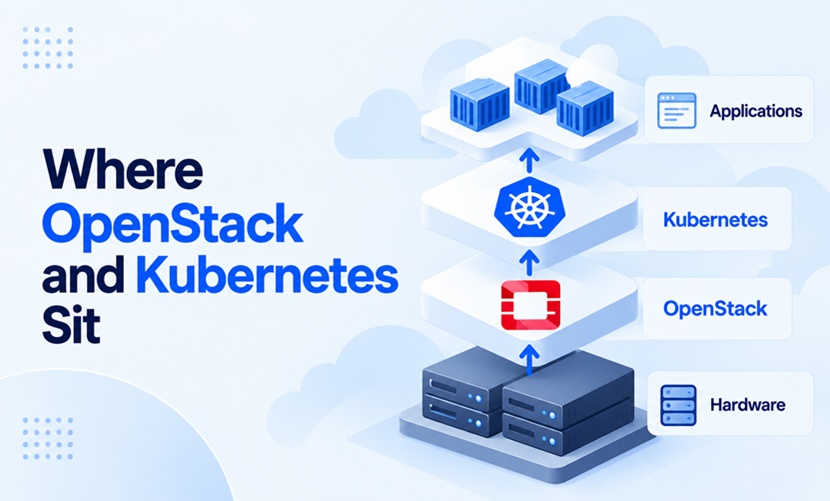
In a typical stack, OpenStack sits directly above the hardware, while Kubernetes sits between the infrastructure and the applications.
Architecture
OpenStack is a collection of independent services, each responsible for one type of resource. The services expose REST APIs (web interfaces that accept standard HTTP requests) to users and to each other. Inside each service, components exchange tasks through a message queue (a service that passes requests between components) and keep their state in a shared database. The core services include:
- Nova. Creates and manages VMs through a hypervisor on each host, most often KVM (Kernel-based Virtual Machine, the hypervisor built into the Linux kernel).
- Neutron. Builds virtual networks with their subnets, connects them through routers, and applies security groups to instances.
- Cinder and Swift. Provides block storage volumes for instances and object storage for unstructured data.
- Keystone. Verifies user identity through authentication and controls access to services through authorization.
Other services cover the remaining infrastructure. Glance stores the disk images used to launch instances, Ironic provisions physical servers the same way Nova provisions VMs, and Horizon provides the web dashboard.
Kubernetes architecture consists of a control plane that manages the cluster and worker nodes that run workloads. The control plane includes:
- API server. Receives each request sent to the cluster and is the only component that communicates directly with etcd, the cluster's data store.
- etcd. Stores the cluster state as key-value data.
- Scheduler. Assigns new workloads to nodes with enough free resources.
- Controller manager. Runs controllers (background processes that keep the cluster in its declared state).
Each worker node runs a kubelet that starts and monitors containers and a container runtime such as containerd or CRI-O. Users describe the desired state in configuration files, and Kubernetes works continuously to match it.
Workloads and Resource Management
OpenStack manages VMs and bare metal servers. A user picks a disk image and an instance size, and OpenStack places the instance on a host with enough free capacity. The instance runs its own operating system, which the user maintains like any physical server.
Kubernetes manages containers grouped into pods, the smallest unit Kubernetes deploys. Containers in a pod share network and storage resources and run on the same node. Instead of requesting machines, users declare the desired state of workloads through Kubernetes objects, each serving a different purpose:
- Deployments. Keep a set number of identical replicas of a stateless application running.
- StatefulSets. Give databases and other stateful services stable network names and persistent storage.
- DaemonSets. Place one pod on each node or on a selected group of nodes for agents such as log collectors.
- Jobs. Run tasks to completion, while CronJobs repeat them on a schedule.
The scheduler places each pod on a node based on its resource requests and other constraints. These include taints and tolerations, which prevent pods from running on nodes that are not meant for them.
In brief, OpenStack users manage machines, while Kubernetes users manage applications and let the platform choose the machine.
Networking and Storage
Both platforms handle networking and storage, but at different levels. OpenStack creates the networks, load balancers, and disks, while Kubernetes defines how applications connect and request storage. Kubernetes relies on plugins to work with the infrastructure beneath the cluster.
The following table compares how each platform handles common networking and storage needs:
| Need | OpenStack | Kubernetes |
| Network Connectivity | Neutron creates virtual networks, subnets, routers, and security groups. | A Container Network Interface (CNI) plugin assigns each pod an IP address and provides pod networking across nodes. |
| Traffic Routing and Load Balancing | Octavia provides load balancers for instances. | Services and Ingress route traffic to pods, while external load balancers come from the underlying platform. |
| Persistent Storage | Cinder provides block volumes, and Manila provides shared file systems. | Persistent volumes are provisioned through Container Storage Interface (CSI) drivers for the underlying storage. |
| Object Storage | Swift stores unstructured data accessed through an API. | Not built in. Applications use an external object storage service. |
This division is the reason the two platforms connect easily. Kubernetes expects another system to supply networks, load balancers, and disks, and OpenStack is built to supply those resources on demand.
Scalability and Resilience
OpenStack scales at the infrastructure level. Operators add hypervisor hosts, storage nodes, or network capacity as demand grows. High availability comes from redundant control plane services and from live migration. Redundant services reduce single points of failure, and live migration moves running VMs between hosts during maintenance. Recovering VMs after a host failure requires additional configuration or services, such as Masakari (the OpenStack instance high-availability service).
Kubernetes scales at the application level, mainly through horizontal scaling. The Horizontal Pod Autoscaler adds or removes pod replicas based on metrics such as CPU usage. Cluster autoscaling tools add or remove nodes by requesting them from the underlying infrastructure. Self-healing is part of the declarative model. When a container crashes or a node fails, controllers detect the difference between the desired and actual state and replace the affected pods. Rolling updates replace pods gradually, keeping the application available during a release.
Strengths
Each platform performs well at the layer it manages. OpenStack gives organizations control over infrastructure, while Kubernetes gives development and operations teams control over how applications run. The main strengths of each platform are:
- OpenStack. Provides a private cloud with self-service provisioning on hardware the organization controls. Built-in multi-tenancy, through projects, quotas, and role-based access control (RBAC), lets one cloud serve many departments or customers as isolated tenants. Its open APIs reduce vendor lock-in and support VMs, bare metal, and accelerators such as GPUs.
- Kubernetes. Packages applications in a portable format that runs on any certified Kubernetes distribution with little or no modification, on premises or in public clouds. It automates rollouts, scaling, and self-healing, reducing manual operations work. A large ecosystem of Kubernetes tools further extends its capabilities for monitoring and security, while CI/CD pipelines and operators automate application deployment and management, including complex workloads such as databases.
Kubernetes portability depends on the infrastructure beneath each cluster. For organizations that run their own hardware, OpenStack provides that infrastructure through the same self-service model public clouds offer.
Limitations
Both platforms are powerful but demanding to operate. OpenStack must manage the full infrastructure layer itself, while Kubernetes depends on infrastructure it does not manage. The main limitations of each platform are:
- OpenStack. Deploying, upgrading, and operating many interdependent services requires dedicated expertise. Each service has its own configuration, and upgrades must follow a defined release sequence. For smaller organizations, the operational overhead may outweigh the benefits of managing a private cloud with OpenStack.
- Kubernetes. Relies on separate infrastructure, such as a public cloud, OpenStack, or bare metal servers. Networking, storage, and security require additional components and careful configuration, and the learning curve is steep. Stateful and legacy applications may need significant changes to run well in containers.
In essence, the limitations of the two platforms relate to operations, since both OpenStack and Kubernetes add a control plane that someone must monitor, secure, and upgrade.
Use Cases
OpenStack fits organizations that need to run cloud infrastructure themselves. Enterprises, universities, and government agencies use it to build private clouds where they control data location and hardware. Regional providers build public clouds on it. Telecom operators use it for network functions virtualization (NFV), running firewalls, routers, and mobile network functions as VMs at central and edge sites instead of dedicated appliances.
Kubernetes fits organizations that build and deliver containerized, cloud-native software. Common Kubernetes use cases include running microservices, hosting test environments for CI/CD pipelines, and keeping applications portable across multi-cloud environments. It is also widely used for big data processing and machine learning workloads that scale up and down frequently.
The telecom industry often combines the two platforms, with operators running containerized network functions on Kubernetes clusters hosted on OpenStack.
Using OpenStack and Kubernetes Together
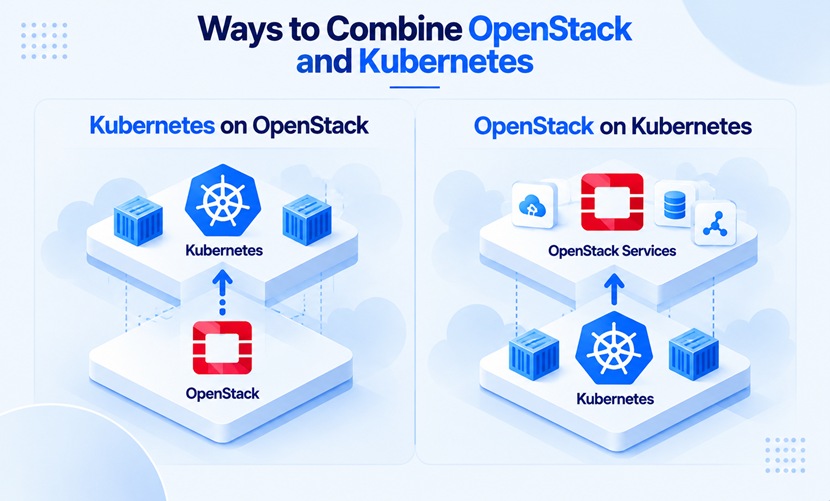
Combining the two platforms lets OpenStack manage machines, networks, and storage while Kubernetes manages the applications on top. Both projects maintain components built for the other, and most combined deployments follow one of two patterns:
- Kubernetes on OpenStack. Kubernetes clusters run on OpenStack VMs or Ironic bare metal servers. The OpenStack cloud provider for Kubernetes lets clusters request Octavia load balancers and Cinder or Manila volumes. Tools such as Magnum and Cluster API Provider OpenStack create and upgrade the clusters themselves.
- OpenStack on Kubernetes. OpenStack services run as containers on a Kubernetes cluster, which handles their deployment, restarts, and upgrades. Community projects such as OpenStack-Helm and commercial distributions such as Red Hat OpenStack Services on OpenShift use this model.
When Kubernetes runs on OpenStack, OpenStack supplies the on-demand infrastructure that Kubernetes lacks on its own. When OpenStack runs on Kubernetes, Kubernetes reduces the effort of keeping OpenStack services available and up to date. Infrastructure-as-code (IaC) tools such as Terraform support both modalities, provisioning OpenStack resources and Kubernetes objects from the same configuration.
Benefits of Combining OpenStack and Kubernetes
A combined stack provides VMs and containers from the organization's own hardware, managed through APIs at both layers. The integration offers advantages that neither platform provides alone, including:
- Self-service infrastructure for clusters. Kubernetes clusters add nodes, load balancers, and volumes through OpenStack APIs instead of waiting for manual provisioning.
- One platform for VMs and containers. Legacy applications remain on VMs while new services run in containers on the same networks, identity service, and hardware.
- Isolated clusters per tenant. OpenStack projects and quotas separate departments or customers, and each one can run its own Kubernetes clusters within its project. This separation is stronger than sharing one cluster through namespaces and RBAC policies.
- Simpler OpenStack operations. Running OpenStack services on Kubernetes brings rolling upgrades and automatic restarts to the infrastructure layer.
- On-demand clusters without a public cloud. Developers get clusters as quickly as in a public cloud, while data and hardware remain under the organization's control.
The combination is most useful for organizations that already run, or plan to run, their own infrastructure at scale.
Challenges of Combining OpenStack and Kubernetes
Running both platforms requires operating two control planes with separate release cycles, configuration models, and failure modes. An upgrade on one side can affect the other. For example, a new Kubernetes version may require a newer release of the OpenStack cloud provider, which must also remain compatible with the OpenStack deployment.
Networking adds complexity. Pod networks run on top of Neutron networks, and this layering can add latency and make troubleshooting harder. Running Kubernetes nodes on VMs also adds hypervisor overhead that workloads on bare metal avoid.
The combination also requires expertise in both ecosystems. Organizations that need Kubernetes but not a full private cloud may find that OpenStack adds operational work that outweighs its value.
Note: Organizations that adopt OpenStack mainly to get on-demand hardware for Kubernetes also take on a second control plane. phoenixNAP's Bare Metal Cloud is a dedicated server with the flexibility of the cloud. Its single-tenant hardware is provisioned through an API or IaC integrations, and Kubernetes clusters with SUSE Rancher deploy directly from the portal. Clusters get dedicated hardware without hypervisor overhead or a separate infrastructure layer to maintain.
OpenStack vs. Kubernetes: How to Choose
The choice depends on which layer needs managing. The following criteria help organizations narrow down the decision:
- Building a private or public cloud. OpenStack fits when workloads run mainly on VMs or bare metal. It is also the stronger option when data location, multi-tenancy, or NFV requirements rule out a public cloud.
- Deploying containerized applications. The case for choosing Kubernetes is strongest when applications run in containers, infrastructure already exists, and the priority is automated deployment and scaling.
- Running VMs and containers at scale. Using both platforms suits organizations that run their own infrastructure and host both workload types side by side. This setup also requires staff who can operate two control planes.
Importantly, staff skills matter as much as features. A small team with Kubernetes experience and no infrastructure specialists rarely needs a self-hosted OpenStack deployment. For that team, a public cloud or dedicated hardware provisioned through an API is usually a better fit.
In summary, an organization wanting to build cloud infrastructure will consider OpenStack, while one that needs to run containerized applications reliably will consider Kubernetes. For organizations looking to do both, the question becomes how to combine them.
OpenStack vs. Kubernetes: FAQ
Older comparisons frequently described these two platforms as rivals. However, OpenStack now integrates directly with Kubernetes, and Kubernetes has extensions that cover some tasks once reserved for infrastructure platforms. The following answers reflect the current state of both projects.
Is OpenStack Still Relevant?
Yes, OpenStack remains actively developed and runs in production at telecom operators, research institutions, and cloud providers. The community publishes two coordinated releases a year, most recently OpenStack 2026.2 Hibiscus. Interest has also grown among organizations looking for alternatives to proprietary virtualization platforms.
Can Kubernetes Replace OpenStack?
No, Kubernetes manages applications, not the hardware, networks, and storage beneath them. Extensions such as KubeVirt enable Kubernetes to run VMs alongside containers, which lets some organizations move VM workloads onto Kubernetes. Multi-tenant private clouds and bare metal provisioning still depend on an infrastructure layer, which is a role OpenStack fills.
Do I Need OpenStack to Run Kubernetes?
No, Kubernetes runs on any infrastructure that provides machines and networking. Common options include public clouds, on-premises virtualization platforms, and dedicated servers, where teams can install Kubernetes on bare metal. OpenStack is one option among these, useful mainly when an organization wants a self-service private cloud beneath its clusters.
Matching Each Platform to the Right Layer
OpenStack and Kubernetes manage different layers of a cloud environment so comparing them is more a matter of suitability than superiority. OpenStack turns hardware into self-service infrastructure, while Kubernetes runs containerized applications on existing infrastructure. Together, they form an open-source stack that covers both infrastructure and applications under an organization's own control. Map your workloads to the layer they need, then decide whether one platform covers them or the combination justifies running both.